🇺🇸
Open app

Before the worksheets.

Clock worksheets go more smoothly once a child has watched the hands actually move.

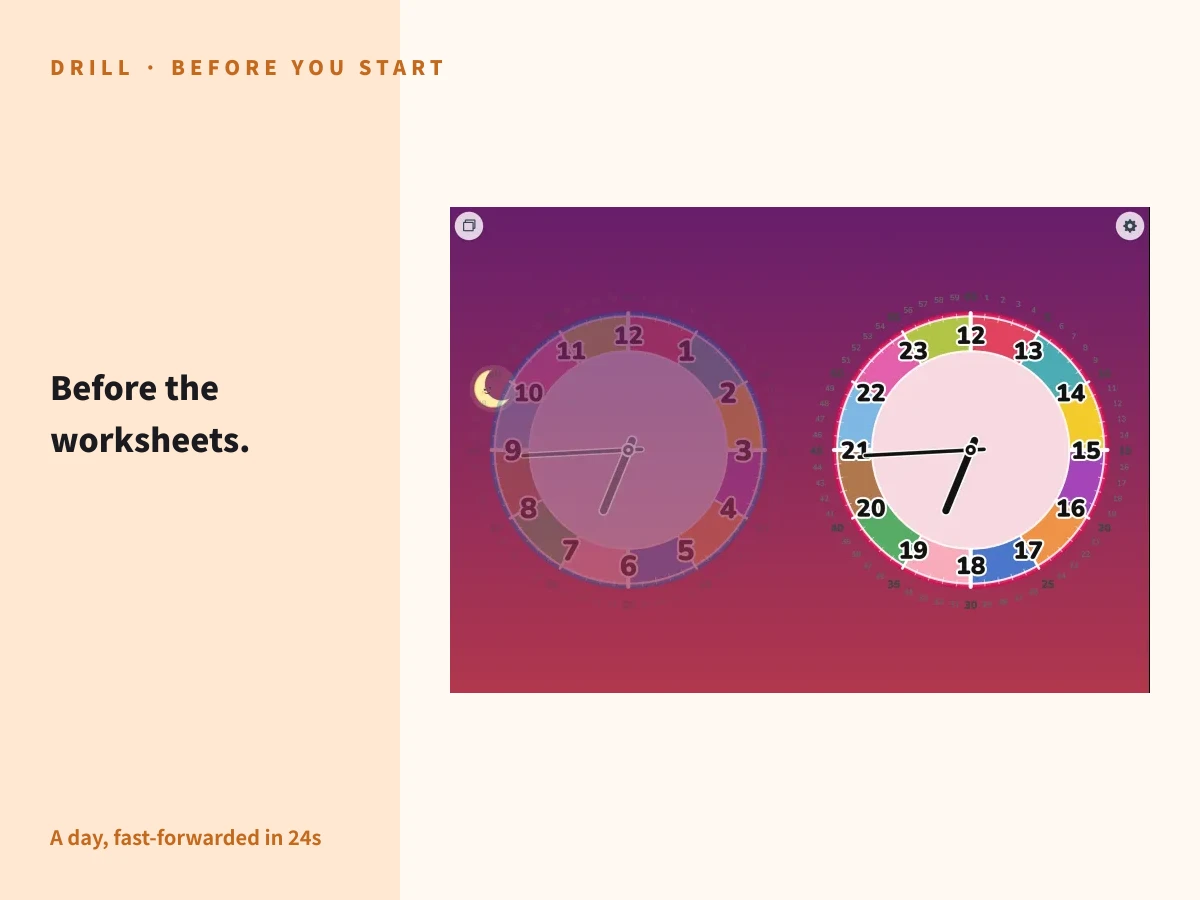
"Before the worksheets." — a tablet showing the AM and PM dials of Futatoki the Learning Clock App side by side with the hands turning in auto spin, the hero image for this article

When people say "clock practice," most of us picture worksheets and workbooks. But a clock is a tool first. A tool is learned faster by watching it work and touching it than by sitting at a desk with it. The worksheets can wait a little.

01

What the worksheets need first.

Hand a child a page of clock faces to read and most of them lose interest partway through. Solving the questions does build something, but being able to read a clock on paper doesn't automatically turn into using a clock during the day.

Reading a clock is less about producing the right answer and more about tying "the time it is now" to "what happens next." Worksheets are good at training the first part. The second part grows in the moments when you wonder together: "what time is it now?" "how long until bath time?"

None of which makes worksheets a bad idea. But asking a child to read a clock they have never really watched leaves them with nothing to hold on to. Show them what a clock does first, and the printed dial on the page starts to mean something.

02

First, let them watch it move.

A day in about 24 seconds. An hour in about one.

The hands of a real clock move very slowly. The minute hand takes a minute to cross one mark, the hour hand takes a whole hour. Watch it as hard as you like — to a child it looks like it is standing still. And if the movement never registers, the numbers and the hand positions stay arbitrary.

The auto spin mode in Futatoki the Learning Clock App fast-forwards a day into about 24 seconds. One hour, about one second. The hands sweep clockwise, the sun and moon rise and set behind them, and the sky moves from morning to noon to evening to night — the movement of a clock, laid out as an animation you can follow with your eyes.

To start it, tap the mode button ( ) at the top left and choose "Auto." Watch a few rounds together, until "the short hand is slow, the long hand is quick" and "12 sits at the top" have sunk in. After that, the dial printed on a worksheet reads as one frozen moment of something that moves.

03

"What time is coming next?"

Tap while it's still turning.

Tap anywhere on the screen while auto spin is running and the hands stop right there, dropping you into free spin mode. That way of stopping is the quiz.

Watch the hands go round, ask "what time is coming next?", and tap whenever you like. Read the stopped hands together. Nobody knows where it will land, so the questions write themselves. If a hard time comes up, leave it stopped and take it apart: "which number is the short hand on?" "and the long one?"

Press "Auto" again and the hands carry on from where you stopped them. They don't jump back to the current time. So the next stop is always later than the last one. When the questions move forward in order, the previous answer becomes a clue for the next: "it was 3:20 a moment ago, and we've moved on a bit since then…" — the time gets read as a distance travelled rather than as an isolated puzzle.

Because the direction of travel and the passing of time are being learned alongside the questions, there is more to hold on to than with times that jump around. Stop a few times on the way from morning to night, read each one, and a single trip around the day is a whole session's worth of practice. Stopping at a natural break is perfectly fine.

  1. 01. Press "Auto" and let it spin (an hour ≈ a second)
  2. 02. Tap the screen to stop it (you land in free spin mode)
  3. 03. Read the stopped hands together
  4. 04. Press "Auto" again (the hands carry on from there)

Switching to "Clock" or "Timer" snaps the hands back to the current time. While you want the questions in order, stay between "Auto" and "Free."

04

"What tiiiiiime… is thiiiis?"

Fast, then slow, then right on it.

There is a second guessing game that lives entirely in free spin mode. In free spin, sliding anywhere on the screen turns the hands. Move your finger fast and they travel a long way; move it slowly and they creep — the speed of your finger decides how far they go.

So: draw out "what tiiiiiime… is thiiiis?" while you whip the hands around with a quick slide. Keep them flying while the question is still stretching out, then slow your finger as you reach "is thiiiis?" and let go just before the time you were aiming for. There is no momentum here, so the hands stop where your finger stops. Where they land is entirely down to you.

Release a hair before the next minute and the hand springs onto it with a little boing. Landing it cleanly feels good enough that children keep asking for one more go. One of you spins and the other reads, then swap — it works either way round.

05

Find it by colour, answer with the number.

Ask a child to read a clock out loud and they usually freeze. A child who can answer "3:25" the moment you ask is already well along. Start further back than that.

"The short hand — which colour is it on?" "Purple!" Point first, name the colour the hand is sitting on. Once the colour comes easily, build the bridge: "and what's the number in the purple part?" The colour is the handle; the number is where you're going.

Whether the number comes out smoothly tells you whether the dial has become a ring of numbers running clockwise in their head. Don't rush the reading aloud. Find it by colour, confirm it by number — the reading grows in those small round trips.

06

When you do move to paper.

Once the movement makes sense and the guessing games are running, worksheets suddenly move quickly. Writing is better on paper anyway, and drawing the hands in pencil teaches the difference in their lengths through the hand itself.

There are printable clock sheets here too. Clock Worksheets has ready-to-print sample PDFs and a ZIP of dials laid out from 06:00 to 21:00 every 15 minutes, in colour and in black and white. The same page explains how to print the app's own screen onto a single sheet. The dial on the paper looks like the dial on the screen, so nothing has to be translated in a child's head.

Keep looking at clocks together after the move to paper. Getting ready in the morning, bath time, bedtime. When you say "we're leaving in ten minutes," point at the part of the dial where those ten minutes are, and check it together. The reading built on worksheets turns into building time with the clock.

GUIDE

Growing how to read the clock together

From "roughly, by color" through to "reading it down to the minute," six steps with sample lines and setting changes for each.

Read the 6-step parent-and-child guide

Try opening it.

Watch it move before the worksheets. Stop it and ask what comes next, spin it and guess, and then go to paper. Just reordering those steps makes clock practice a good deal lighter.

Futatoki runs in the browser. No account, no install. Press "Auto" and watch a day go by together — that's a fine place to start.

Back to home